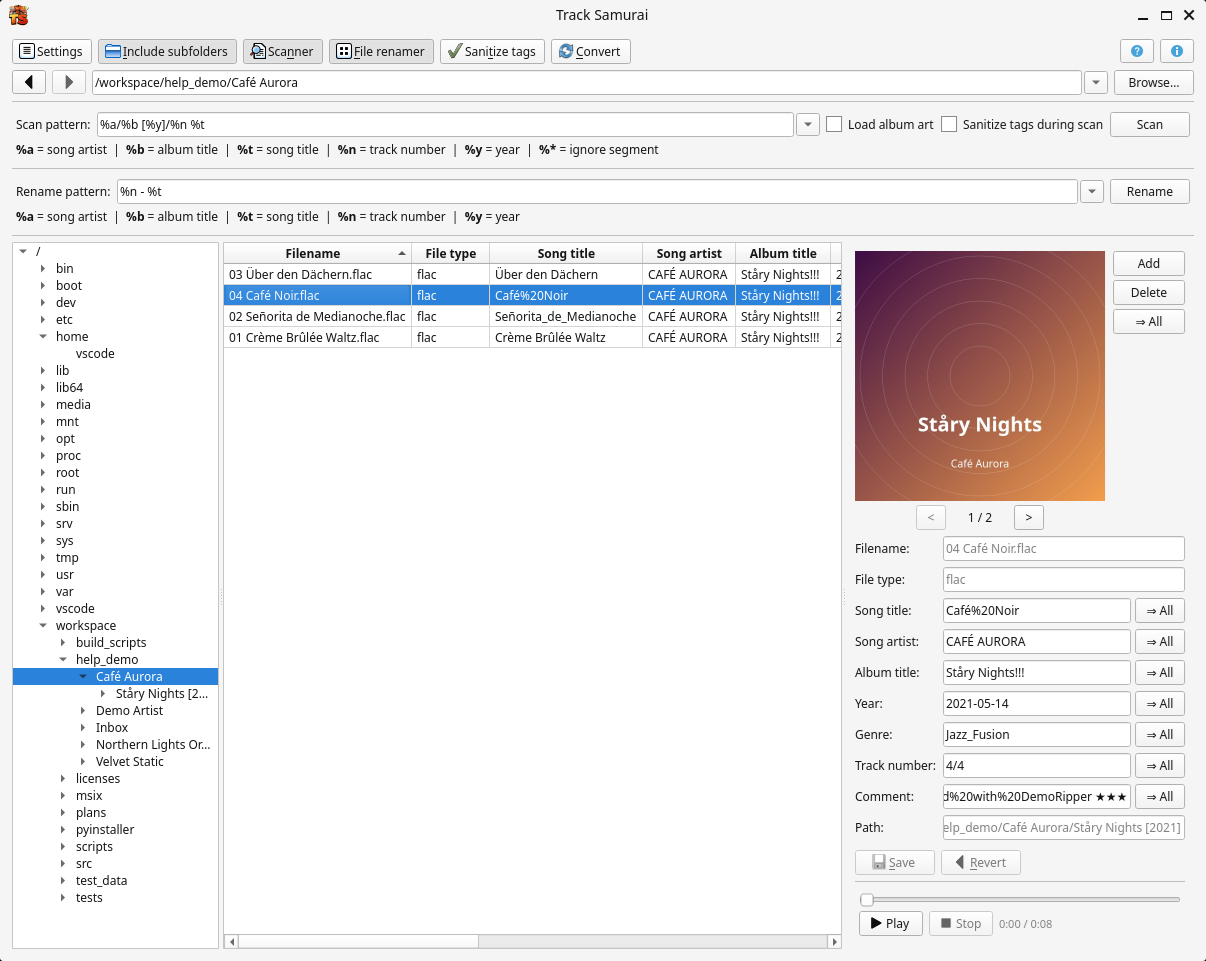
Everything you need to turn a messy music folder into a clean, consistently tagged library.
🏷️
Tag Editor
Read and write title, artist, album, year, genre, track number and comment of MP3, FLAC and OGG Vorbis files.
📂
Tags from Folder Structure
Describe your folder layout with a pattern like %a/%b [%y]/%n %t and fill in the tags of a whole collection at once.
🧹
Tag Sanitization
Unify letter case, remove accents, underscores and unwanted characters, and clean up years and track numbers with one click.
👁️
Review Before Saving
Every change is only proposed and highlighted in bold. Nothing is written to your files until you click Save.
⇒
Apply to All
Set the same album, artist, year, genre or album art for all selected files with a single click.
🖼️
Album Art
Add, browse and remove embedded cover images, or load them from the image files in the album folder.
✏️
File Renamer
Rename files from their tags, e.g. %n - %t → 05 - Sing this.mp3, with automatic zero padding and conflict checks.
🔄
Audio Conversion
Convert between MP3, FLAC and OGG Vorbis (and from WAV), keeping tags and album art. No ffmpeg needed.
⚙️
Comfortable to Use
Light and dark themes, keyboard shortcuts, folder management, audio preview and remembered layout and history.

 Windows
 Linux
 macOS